So, if you're going to demonstrate the box drawing characters — and in a monospaced font, I would — they should line up?
E.g., under "lines", the rows are overlapping; https://i.imgur.com/KnOP2Wu.png ; I would think they're only supposed to just touch, with no gap, no overlap.
The boxes, similarly, don't quite line up right. https://i.imgur.com/6pVYh9a.png (Even the 100% box isn't lining up right, although somehow what FF screenshotted != what it rendered. sigh.) The point being, you want these to tile seamlessly. Oddly, they tile differently in the pictures-of-font that break up the page. (Which I'm not sure what they're supposed to be? One is called "5af1d7a5-fa60-4827-9b4f-808cdb635d59" and has no alt text. They remind me of Dwarf Fortress though.)
As other people hint, this seems like the line height is cramped. I/l/1 ambiguities is a deal breaker for any terminal font, though.
Number One, Pipe Character, lower case L, upper case I, zero and O, Parentheses and Brackets, are so common pain points on coding and terminal fonts. Those should be painfully distinct.
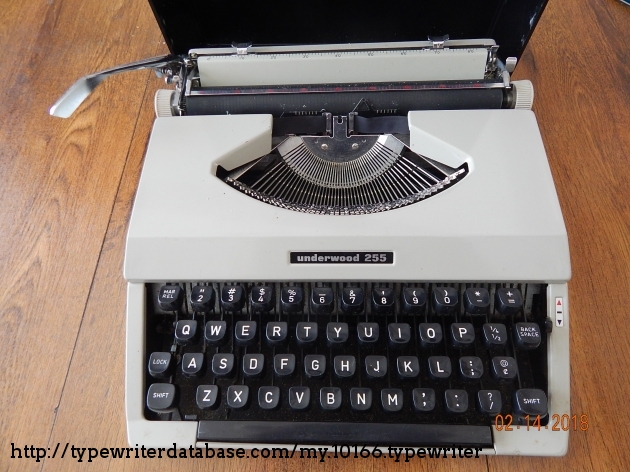
Maybe that's what they meant by "inspired by typewriters" (on many typewriters there was no 1, you had to use lowercase L)? But I agree that this is not a "feature" you want to have in a font that you use in terminals and/or for programming.
I kinda feel like the difference between the 1 and l is still reasonably obvious, the top serif is significantly different. But it could be improved by removing the bottom left serif from the l.
I've never understood why the lowercase l and 1 so often look the same in monospace fonts. It's not like anyone actually writes an l like that — why not just a small bottom right hook? And maybe a top left hook as well? But a whole base is insanity.
I agree that this is a bad decision for programming, but the reason most fixed-width fonts do that is that they can look visually uneven if they don't use exaggerated serifs on narrow characters. It can even get to the point where words look like they have spaces in them if the wrong characters are next to each other.
Monospace (https://monaspace.githubnext.com/) has a feature that dynamically changes between different versions of characters and moves them inside their space in the font grid to make up for that. But even so, its bottom serifs on 1, I, and l extend to both sides.
Cascadia Code (https://github.com/microsoft/cascadia-code) has a lower-case L whose bottom serif only extends to the right. It's the typeface I use for writing code, and IMO, it's currently the best option available.
> I would think they're only supposed to just touch, with no gap, no overlap.
Because of variations on how software terminals and GUIs render fonts, this is very tricky. That’s why so many terminal programs take over box-drawing characters and implement the glyphs themselves. This way the glyphs defined by the font are a rendering failsafe and it’s sometimes better to not even implement them and leave it to the systems font substitution mechanisms.
Hardware terminals had fixed vertical spacing, which made alignment much easier.
Yeah it's driving me crazy honestly -- why put art on there if it's not recognizable as anything?? It does indeed look like the overworld from DF, but not quite coherent enough...
FWIW everyone's complaining about this so I'll throw in the recent monospace release that absolutely blew me away: https://monaspace.githubnext.com/ Who needs hackers when you have Microsoft the evil tech conglomerate pumping out fonts, anyway?
Another good Microsoft monospace font: Cascadia. Something about it just makes it super legible for me when coding in it, plus it has nerd fonts built in without needing to be patched.
To me the "art" blocks look like converted stills from a movie or TV show, or from existing artwork: two figures facing each other in the first, three figures in the second, a... galloping horse with a cloaked rider in the third? But I could be completely wrong on all of that.
For those commenting on the importance of character ambiguity, I completely agree, and offer "DP Sans Mono", a font specifically designed for unambiguous proofreading.
This is magnified 2x (to show the similarity). Both the sample alphabet and the "character differences" shows uppercase-eye and lowercase-ell as the identical glyph, for DPSansMono.
The line spacing is way too tight (this is line-spacing: 1).
Obviously that is beneficial for ASCII-art (smaller vertical gaps), but plain text would benefit from at least 1.1 and maybe 1.2.
I am not a typographer but the cap height of this font (I think it's the cap height) appears quite large, when perhaps it would be better to have a slightly smaller cap height so the ASCII-art features would work well at line-height 1.0 without the letters feeling so vertically cramped.
line spacing beyond minimal ought not be an attribute of a font. I can see a "recommended" line spacing for some type of "vertical as well as horizontal beauty", but drives me nuts when choosing a font also chooses scads of whitespace.
I like to squeeze a lot of info on a page, why do other people get to say "no". Sure, space out your wedding invitation, I can deal, but on the daily text on my screen, that should be up to me.
I do prefer "typewriter" fonts that are more squoze horizontally, this one seems to have loosened the ol belt a little, maybe for more "squareness".
The problem is that to resolve the readability issues many people seem to be observing on that page you need to set it to 1.1 or 1.2 (try it!)
But that will break the console pseudographics.
Part of the problem with this font appears to be large, space-filling (yes, squareness is another way to put it) glyphs, when if they had a bit more of a difference between the cap height and the ascender height the full-height pseudo graphical glyph stuff would still work without the textual characters feeling so cramped.
At least, I think that is right. I know just about this stuff to be wrong in important ways.
Either way there must be a solution to this; it feels like a missed opportunity.
It does have that feel, but it's decidedly cramped compared to, say, the VT100's font, or even that of the VT52, which are both a bit closer to the "server" heritage they are alluding to.
Many other "code page 437" (console graphics fonts) do much better than this for readability at base line-height.
For me it’s the weird mix of serifs and san-serif letters. Just off putting and weird it kind of feels like reading a note from a kidnapper made of clipped magazine letters pasted together.
I don't like it. As someone else pointed out, the line spacing is too tight and that might be part of it, but I feel like it is too heavy (thick? Something in between bold and regular, whatever that is called).
Actually, it was /most/ typewriters. Having a numeral one (1) key on a keyboard was something brought about by computer input keyboards (where there did, indeed, need to be a distinct numeral one separate from lower case-ell (l)).
But for most typewriters, the ell (l) key also served as the numeral one key.
not really, in the sense that it would be a really old typewriter, there aren't any new typewriters. I'm not super old, and typewriters I used in high school did not have a one. Nobody had an IBM Selectric at home.
BTW on the same subject of fonts, you want to be able to distinguish between 1, l, and I which are not always distinguishable.
Yeah it's annoying in several fonts, not just that one. So I simply modify the font I'm using: one thing I do is I remove the lower left horizontal bar from lowercase 'l', that way it cannot be mistaken from a '1'.
Basically changing what's on the left to what's on the right:
    ***         ***
      *           *
      *           *
      *           *
    *****         ***
It's a little trick I've been using since so long I don't even remember since when I'm doing that.
Nitpick: the acknowledgements make a cute usage of "thy" and "thou hast". However, they actually refer to multiple individuals, and need to use "your" and "you have". Boring, and wrecks the aesthetic, I know...
I also highly recommend PragmataPro⁽¹⁾ if you prefer more characters per line. It’s €199 for the complete typeface, but well worth it for something you interact with for many hours per day, every day. More than 9000 characters have been hand-optimized
from 9pt to 48pt to guarantee the best possible readability. (You can start off with the “Essentials” variant for only €19, which is definitely a bargain!)
Goes on sale every year during Black Friday. 100% worth it even without the discount. Love Berkley Mono too.
Iosevka (https://typeof.net/Iosevka/) is a good free alternative that I like to use for online IDEs/REPLs and such. (Berkley Mono's contract forbids this kind of usage, which I understand, but I wish I could use it more!)
I'm also not enthralled with this. Mind you, I really like Cascadia Code, which in its 2024 iteration includes NerdFonts characters. Finally, something done by Microsoft that I can recommend unreservedly!
Font seems to not include the '<', '>', or '=' characters. I sympathize with font designers, there are so many glyphs you have to stare at - hundred if not thousands - for days and weeks on end; eventually you get tired of seeing them...
Not sure what the images on this page are supposed to be, they don’t load in iOS Safari. Also I’m not seeing the 1/I/l confusion other people are talking about, so it’s possible the font isn’t rendering in Safari either and it’s falling back to the default monospace font.
Perfect line spacing, other fonts have it way too wide between lines, screen feels half-empty. Great font, switching to it . Medium weight would be lovely, though
It may not be just that. I sometimes end up using the light weight to improve readability, especially on light background, plus in some cases regular is more like semi-bold.
Tangential, but I quite like this quote:
“Just as the scientist must think and experiment alternately, so the artist, the author and the scholar must alternate creation or study with participation in the life around them.”
How far back from the monitor should I be to be able to interpret what the ASCII art blocks are showing? Seems like maybe they were inspired by those 90's "Magic Eye" pictures.
I am not sure if I like the font or not, but I do like the corpus of text used to demonstrate the character rendering. At first glance, I thought it was Quenya or Sindarin, but I am not too sure.
After reading through the thread, I want to show my warm and honest appreciation for Server Mono.
I like the art! I like the feel and… idk, visual rhythm? One man’s inconsistent is another man’s lively. I like the tight linespacing; Am of the opinion that line art glyphs should touch each other across lines – of course! – but it can’t be solved at the font level. We need console-oriented text rendering that knows how to connect those glyps. Could be done automatically but seems awkward. Could be done even better with, say, some kind of anchor points embedded into the font file – in a particular UNICODE location maybe?
And I for one don’t really mind I and l and 1 looking similar. Distinct is better but I am fond of the historic imperfection. O and 0 absolutely need to be distinguishable though! haha
Moaning about my personal preference, it's not for me. I find the letter shapes inconsistent and line spacing is too narrow. My eyes hurt after reading a few lines.




E.g., under "lines", the rows are overlapping; https://i.imgur.com/KnOP2Wu.png ; I would think they're only supposed to just touch, with no gap, no overlap.
The boxes, similarly, don't quite line up right. https://i.imgur.com/6pVYh9a.png (Even the 100% box isn't lining up right, although somehow what FF screenshotted != what it rendered. sigh.) The point being, you want these to tile seamlessly. Oddly, they tile differently in the pictures-of-font that break up the page. (Which I'm not sure what they're supposed to be? One is called "5af1d7a5-fa60-4827-9b4f-808cdb635d59" and has no alt text. They remind me of Dwarf Fortress though.)
As other people hint, this seems like the line height is cramped. I/l/1 ambiguities is a deal breaker for any terminal font, though.